S3, finally usable.
Browse, search, and move files across every bucket you own — AWS, R2, MinIO and anything else that speaks S3 — like it's a drive.
No credit card · Your keys stay encrypted · Connect in under a minute
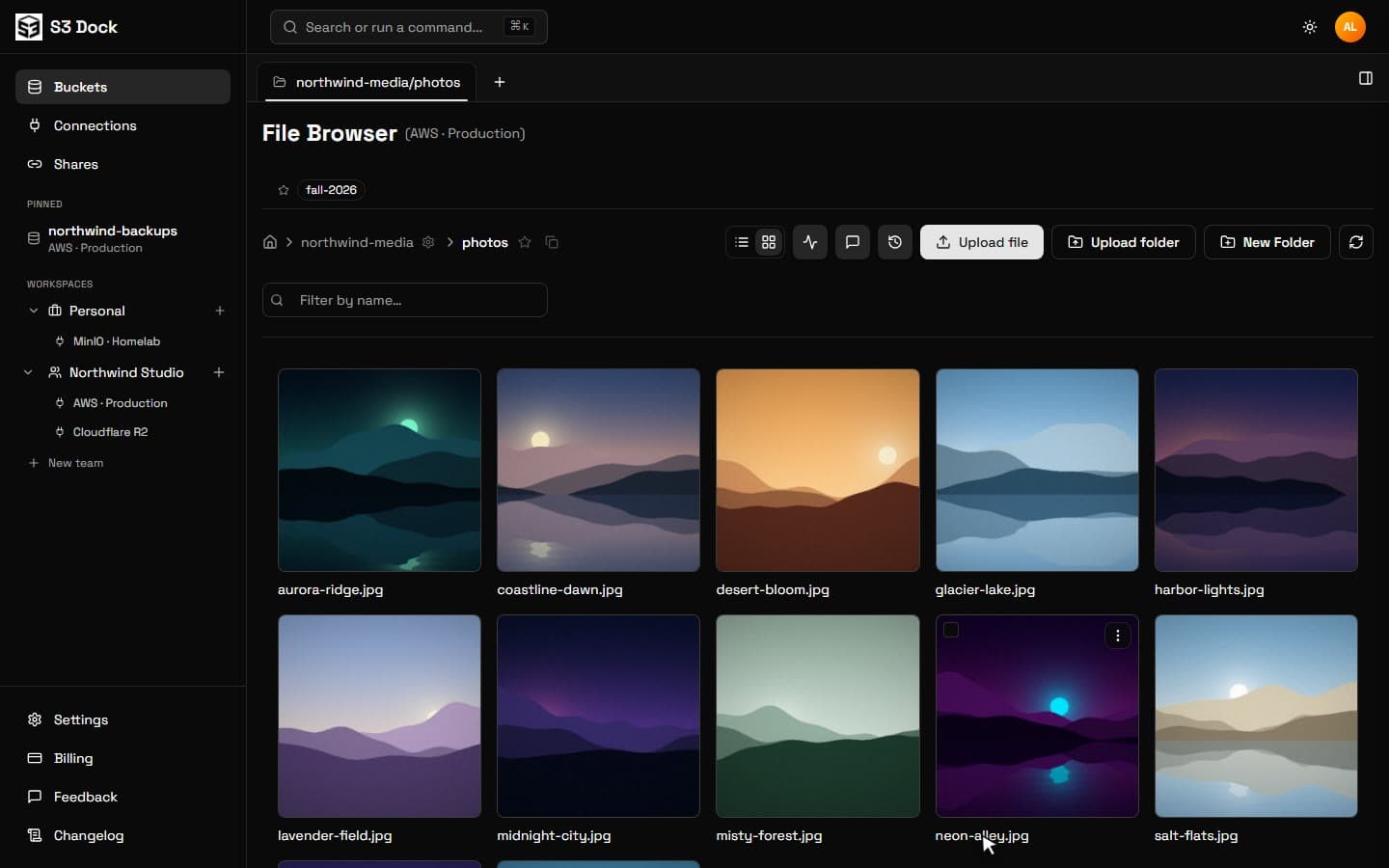
Real product, real UI — recorded, not rendered
The AWS console wasn't built for humans.
We built one that was.
The tour
Everything you wish the console did.
No mockups. These are recordings of the real app.
Folders, not prefixes.
Every connection and bucket in one sidebar. Click into folders, flip to a thumbnail grid, and see what's actually in there.
- Image thumbnails and file previews
- Pinned folders and bucket favorites
- Sizes, dates and versioning at a glance
Find any file, in any bucket.
Hit ⌘K and type. Results come back from every connection at once — AWS, R2 and MinIO in one list.
- One search box across all your clouds
- Jump straight to the folder
- Commands for everything, no menus
Drag files between clouds.
Split the view, open a second bucket — even on another provider — and drag. S3 Dock does the copy server-side.
- Side-by-side panes and tabs
- Copy or move across providers
- Live progress in the notification tray
Power tools, zero terminal.
The small things the console makes hard, one click away.
Tabs & split panes
Keep five buckets open. Work across two at once.
Versions
Every revision of every file. Restore with one click.
Previews
Images, video, PDFs and text, without downloading.
Share links
Expiring public links for anyone, no AWS account needed.
Notes & tags
Leave context on files so the next person knows why.
Activity feed
See who uploaded, moved or deleted what, and when.
Permission checks
Know what your keys can do before you click.
MCP server
Let your AI agent browse and fetch files safely.
One client. Every S3.
If it speaks the S3 protocol, S3 Dock connects to it. Setup takes about thirty seconds.
New connection
Endpoint
Access key
Secret key
Storage your whole team can actually use.
Share links, granular permissions, and team workspaces — without handing out AWS keys.
Simple pricing. No surprises.
Start free. Upgrade when your storage outgrows you.
Free
$0
forever
Pro
$4
per month
Enterprise
Custom
Questions, answered.
Do you store my files?+
No. Your files stay in your buckets — S3 Dock talks directly to your S3 endpoint. We store connection metadata and your credentials, encrypted at rest.
Which providers work?+
Anything that speaks the S3 protocol: AWS S3, Cloudflare R2, MinIO, Backblaze B2, DigitalOcean Spaces, Wasabi, Ceph, and more.
Is my data secure?+
Credentials are encrypted at rest, all traffic runs over HTTPS, and secret keys are never exposed in list responses.
Can I cancel anytime?+
Yes. Downgrade or cancel from the billing page whenever you like — your connections and settings stay put.
Is there a free plan?+
Yes — two connections and 1,000 operations a month, free forever. No credit card required.
Stop fighting the console.
Connect your first bucket in under a minute.